Configuration editing
For all installed packages, a minimum amount of configuration editing is required. There is no UI available for any of the packages.
For more experienced users, this can be done via ssh, rsync and vim.
Another method is to mount the Configuration shared folder and edit the files directly on your workstation through the mount.
Alternatively, the file can be downloaded, modified locally, and then re-uploaded.
ssh & vim
The simplest way to modify configuration files is to ssh into the NAS and use vi or vim.
By default, only vi is available on the NAS. Nevertheless, a vim package , intended to replace vi, is available at the following address: https://asustor.cappysan.dev/vim/
For reference, packages that are installed have their files in the /usr/local/AppCentral/ folder. Configuration files for these packages, created by installing the Cappysan packages, are available on /share/Configuration
download, modify, upload
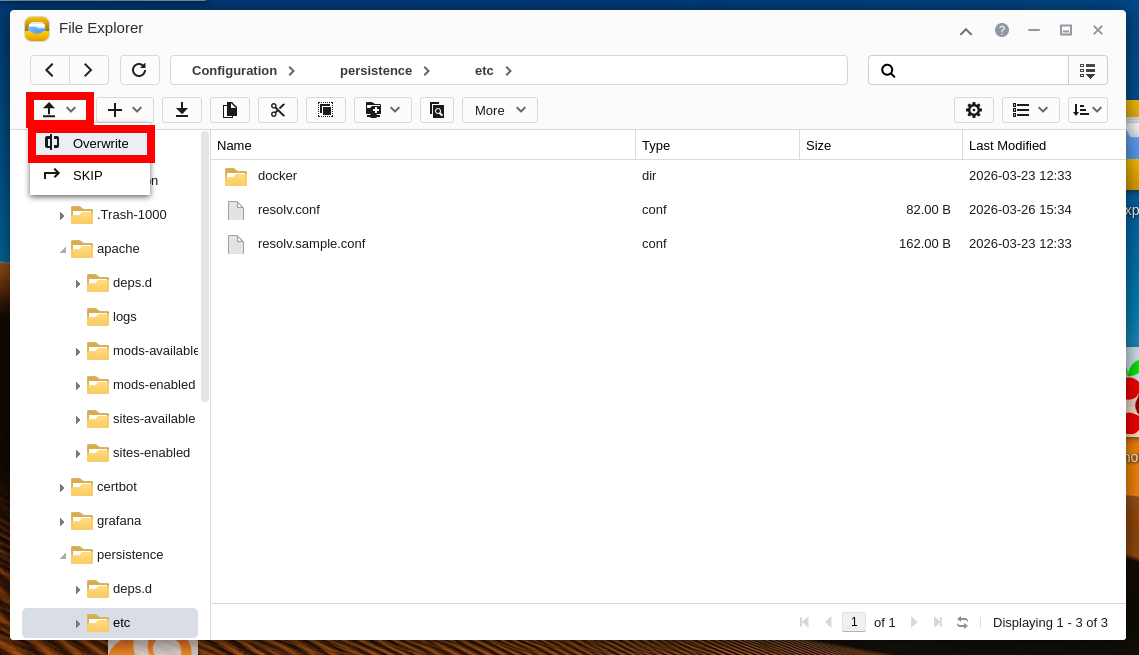
An alternative method, which does not require familiarity with ssh or vim, even mounting a folder, is to download, edit, and then re-upload the configuration files via the File Explorer on the NAS.
In the File Explorer, navigate to the file you wish to edit. These files are all located in a subdirectory of the Configuration shared folder.
Download the file by double-clicking it.
Edit it locally on your PC.
You can then upload it, overwriting the previous file if necessary.