Sideload APK
Sideloading is the process of installing an application from outside the official AppCentral store. All packages in this documentation are installed this way.
Installation
Open AppCentral, go to Management, then select Manual Install.
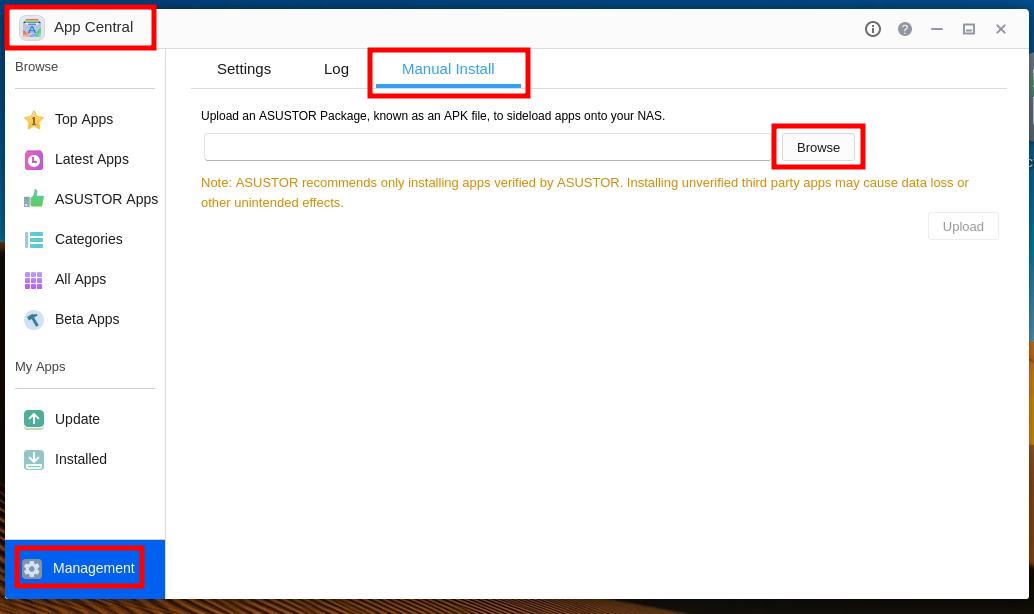
Click Browse, select the
.apkfile, then click Upload.If a missing dependency warning appears, go back to All Apps, search for the missing package, install it, then repeat from the beginning.
Confirm the two About This App dialogs. Installation will proceed automatically.
Uninstallation
To remove a sideloaded application, open AppCentral, locate the package, and uninstall it as you would any other application.
Note
Uninstalling a package does not remove its configuration. The configuration files remain in the Configuration shared folder and will be reused if the package is reinstalled.